ÇÖZÜM BULAMADINIZ MI?
TEKNİK BİR SORUN YAŞIYORSANIZ UZMAN EKİBİMİZE ANINDA ULAŞABİLİRSİNİZ.
Add Brand on E-Commerce Panel
In order to add products without integration to your e-commerce site, first category and brand must entrered. In this article, we will explain about adding brands.
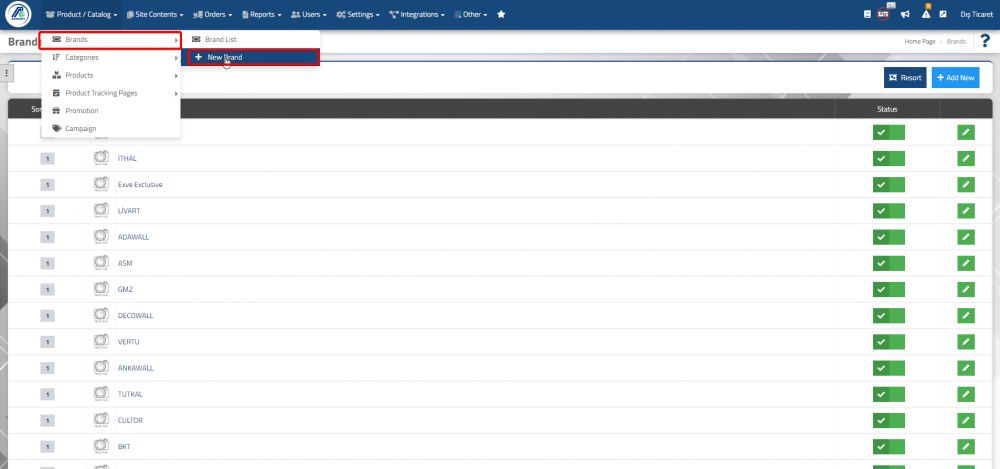
In your E-Commerce panel, click on Add new in the Product / Catalog => Brands => New Brand field and the brand page can view.
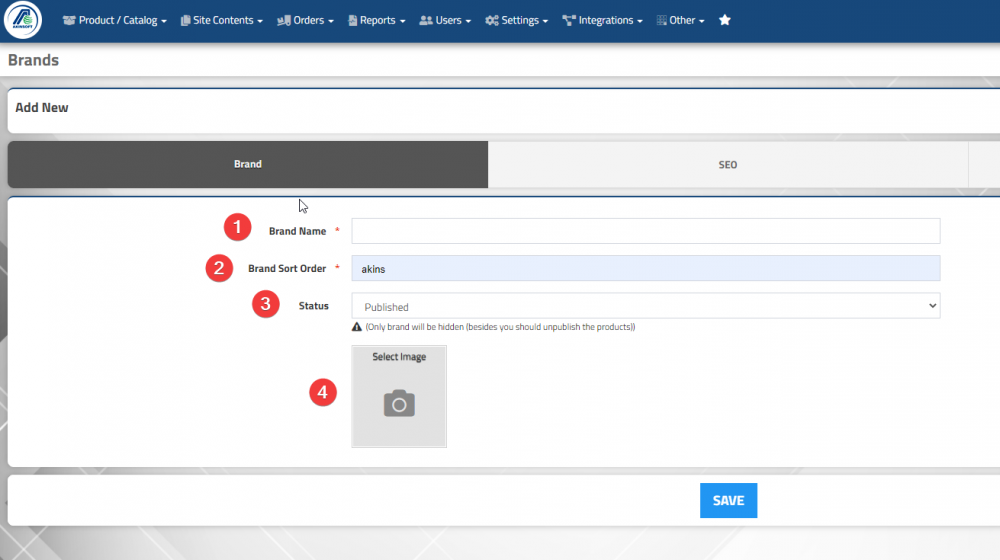
1-Brand Name : Enter the brand name you will use.
2-Brand Item No :You can define the sort of your brand will display.
3-Status : You can define your brand published or unpublished
4-Image : You can add images for your brand.
After save general information about your brand you can continue SEO tab.
1- SEO Link : When you save your brand, seo link is created automatically.
2- Meta Title : You can enter meta title belongs to your brand.
3- Meta Keys : You can enter meta key informations belong to your brand.
4- Meta Description : You can enter meta descriptions belong to your brand.
5- H Labels : You can enter H labels in the appropriate format.
6- URL : Your brands’ URL addresses created automatically. When you enter a brand on your products, all products belonging to that brand are published at the specified url address.
BAŞKA BİR SORUNUZ MU VAR?
TEKNİK DESTEK EKİBİMİZE 7/24 ULAŞABİLİR VE TÜM SORULARINIZI İLETEBİLİRSİNİZ.
GÜVENLİK DOĞRULAMASI
Lütfen işlemi onaylayın