ÇÖZÜM BULAMADINIZ MI?
TEKNİK BİR SORUN YAŞIYORSANIZ UZMAN EKİBİMİZE ANINDA ULAŞABİLİRSİNİZ.
Automatic Refreshing in Wolvox ERP Reports
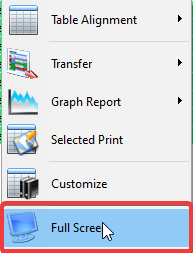
AKINSOFT Wolvox ERP program enables to get reports on full screen and refresh periodically. All you need to do is open any list result and select “Full Screen” from the drop down menu when you “Right Click”.
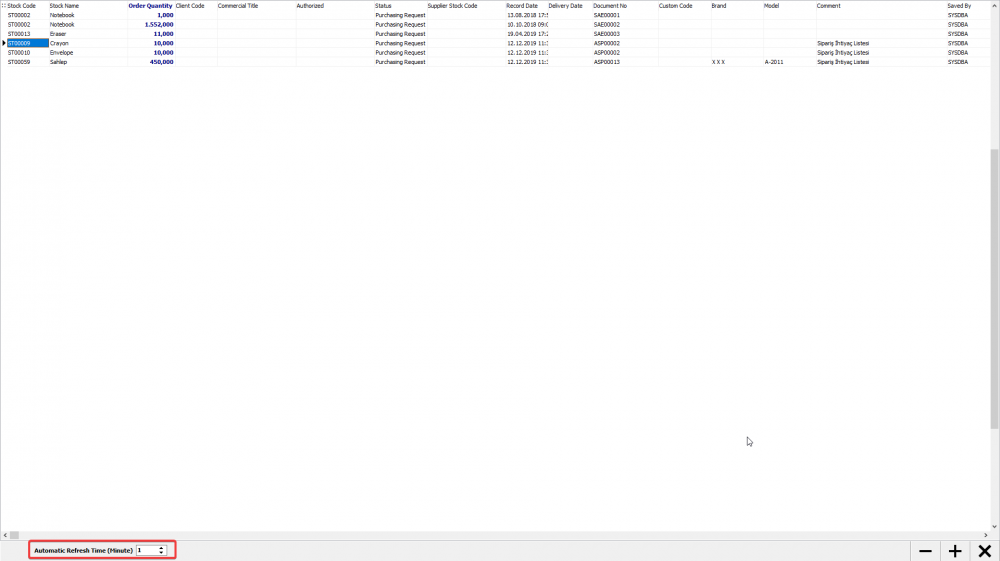
In the “Auto Refresh Time (minute)” section at the bottom left of the full screen mode, you can enter the time and refresh it for the period you specify. When a new row is added to the list, it will automatically be added to the list because filtering will take place. You can also adjust the font size with the ‘-‘ and ‘+’ buttons.
BAŞKA BİR SORUNUZ MU VAR?
TEKNİK DESTEK EKİBİMİZE 7/24 ULAŞABİLİR VE TÜM SORULARINIZI İLETEBİLİRSİNİZ.
GÜVENLİK DOĞRULAMASI
Lütfen işlemi onaylayın