ÇÖZÜM BULAMADINIZ MI?
TEKNİK BİR SORUN YAŞIYORSANIZ UZMAN EKİBİMİZE ANINDA ULAŞABİLİRSİNİZ.
How can I do “Check / Voucher” Status Change (Added to Turnover, On Clearing Process, Received, Paid from Cash Account, Paid from the bank ..) operations?
In AKINSOFT program, you need to use the ‘Check/VoucherTransactions’ screen to make status changes in your Check/Voucher records.
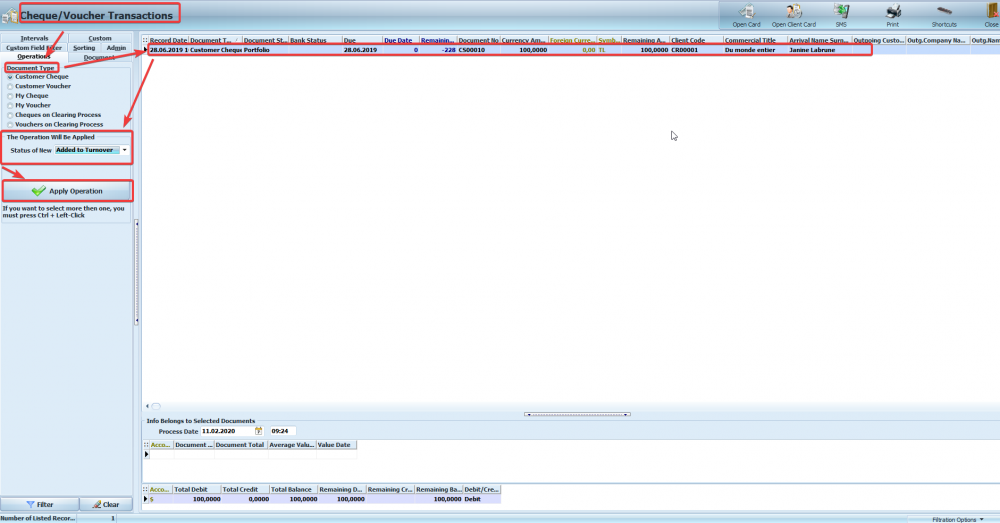
- Enter the ‘Cheque/Voucher Transactions’ screen.
- Select ‘Document Type’.
- Select the operation to be performed for this document in the ‘The Operation Will Be Applied’ field.
- Click the ‘Apply Operation’ button.
If the document is going to be turnover, “Client Selection” will be displayed after you click the “Apply Operation” button. From this screen, you can complete your transaction by making your client selection for Turnover operation.
Transactions that can be applied according to Check/Voucher status;
Customer Cheque ► ‘On Clearing Process, ‘Bank Credit’, ‘Received’, ‘Added to Turnover’, ‘Branch Transfer”
Customer Voucher ► ‘On Clearing Process, ‘Bank Credit’, ‘Received’, ‘Added to Turnover’, ‘Branch Transfer”
My Cheque ► ‘Paid from Bank‘, ‘Paid from Cash Account’
My Voucher ► ‘Paid from Bank’, ‘Paid from Cash Account’
Cheques on Clearing Process ► ‘Received‘, ‘Returned’
Vouchers on Clearing Process ► ‘Received’, ‘Returned’
BAŞKA BİR SORUNUZ MU VAR?
TEKNİK DESTEK EKİBİMİZE 7/24 ULAŞABİLİR VE TÜM SORULARINIZI İLETEBİLİRSİNİZ.
GÜVENLİK DOĞRULAMASI
Lütfen işlemi onaylayın