ÇÖZÜM BULAMADINIZ MI?
TEKNİK BİR SORUN YAŞIYORSANIZ UZMAN EKİBİMİZE ANINDA ULAŞABİLİRSİNİZ.
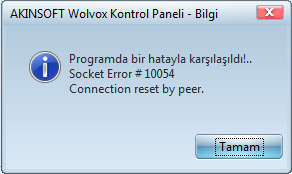
I am getting an error ”Socket Error #10054 Connection Reset By Peer” at Control Panel. How do I resolve this error ?
The reason for the ‘Socket Error #10054 Connection Reset By Peer’ error when logging in from the AKINSOFT Wolvox control panel program; is due to the SQL Server Browser service being stopped or disabled.
- Start –> Programs
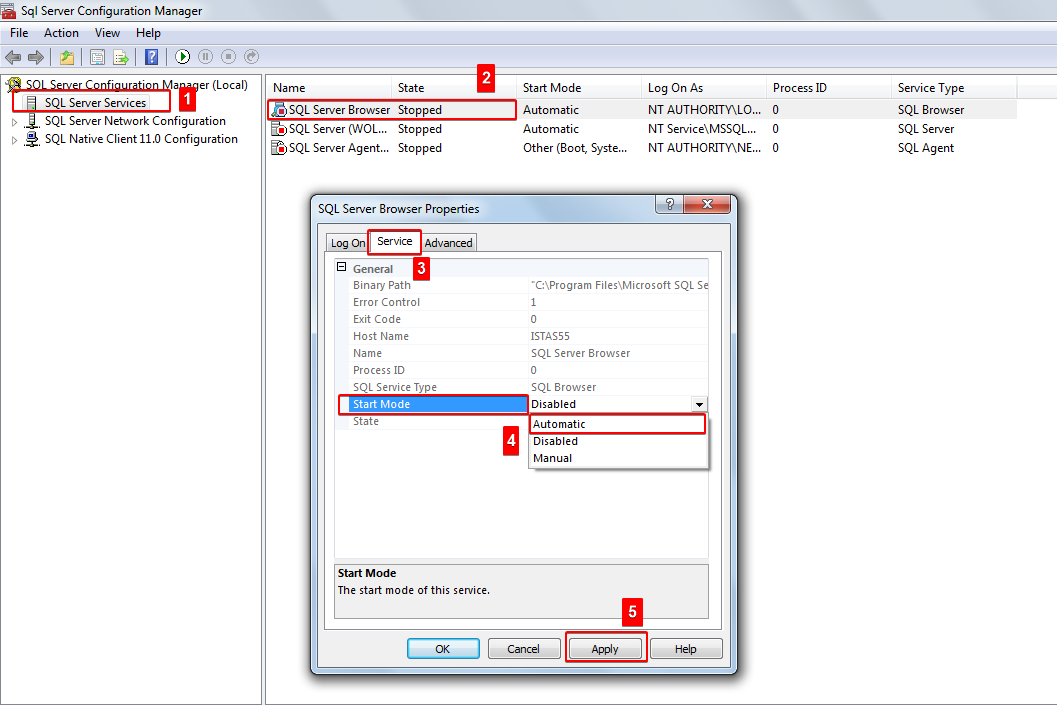
- Microsoft SQL Server R2 – Configuration Tools – SQL Server Configuration Manager
- Click on SQL Server Services.
- Double click on SQL Server Browser.
- Click on the service tab, select ‘Automatic’ and press the ‘Apply’ button.
- Then click on the ‘Log On’ tab and press the ‘Start’ button.
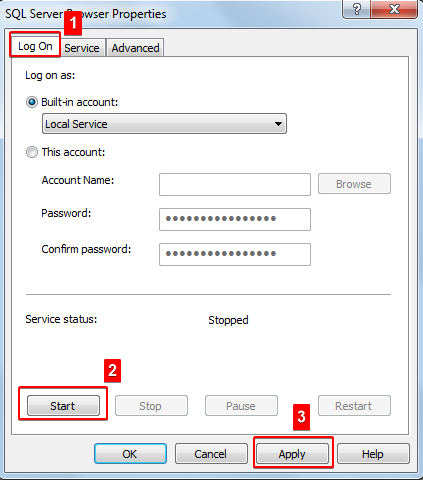
After completing the procedures, you can log in from our AKINSOFT Wolvox Control panel program.
BAŞKA BİR SORUNUZ MU VAR?
TEKNİK DESTEK EKİBİMİZE 7/24 ULAŞABİLİR VE TÜM SORULARINIZI İLETEBİLİRSİNİZ.
GÜVENLİK DOĞRULAMASI
Lütfen işlemi onaylayın