ÇÖZÜM BULAMADINIZ MI?
TEKNİK BİR SORUN YAŞIYORSANIZ UZMAN EKİBİMİZE ANINDA ULAŞABİLİRSİNİZ.
Stock Group Definitions
-
You can create group , middle group and subgroup for your stocks by using the ‘Stock Group Definitions’ field .
-
If you use Akınsoft E-Commerce , You should select the ‘ View on the Web ‘ field so that the groups, middle groups and sub-groups you create will appear on your site.
-
To create a group for your stock, you can type the group name. If you want , you can type the comment and series number for your group . To complete the record , you can click the ‘Save’ button.
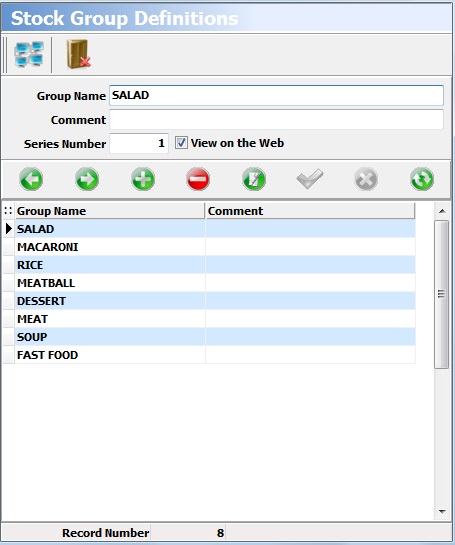
-
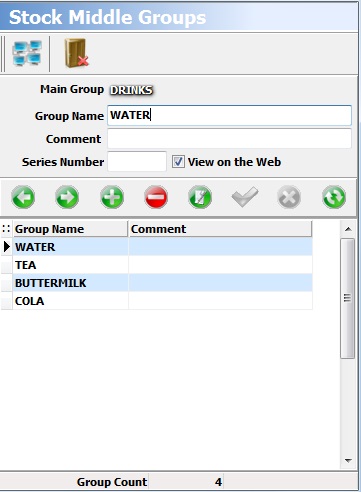
To create a middle group for your group, you can click the ‘Middle Group Records’ button. On the screen that appears, You can type the name of the middle group you will create. If you want , you can type the comment and series number for your middle group.To complete the record , you can click the ‘Save’ button.
-
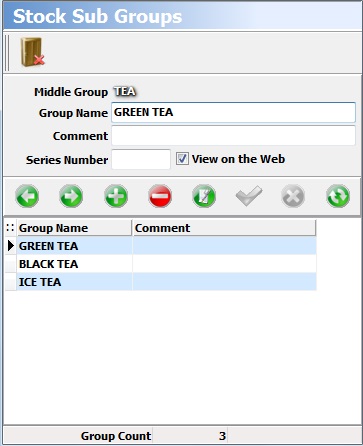
To create a sub group for your middle group, you can click the ‘Sub-Group Records’ button. On the screen that appears, You can type the name of the subgroup you will create. If you want , you can type the comment and series number for your sub group.To complete the record, you can click the ‘Save’ button.
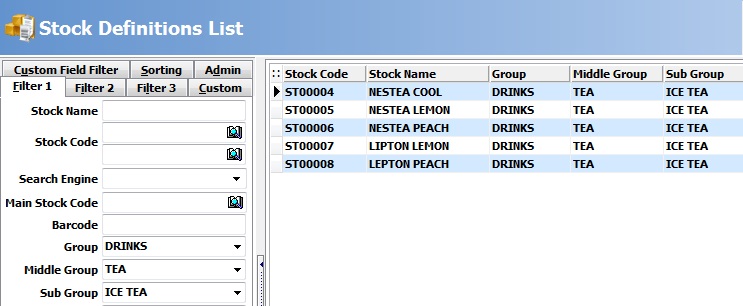
- You can list stocks by group, middle group and subgroup by using the features of filtration in the report.
BAŞKA BİR SORUNUZ MU VAR?
TEKNİK DESTEK EKİBİMİZE 7/24 ULAŞABİLİR VE TÜM SORULARINIZI İLETEBİLİRSİNİZ.
GÜVENLİK DOĞRULAMASI
Lütfen işlemi onaylayın