ÇÖZÜM BULAMADINIZ MI?
TEKNİK BİR SORUN YAŞIYORSANIZ UZMAN EKİBİMİZE ANINDA ULAŞABİLİRSİNİZ.
There is no Block/Deadline option in Received or Given Order form
If stock block/deadline option is not visible at received or given order form in Wolvox ERP, situations needed to be checked are as below.
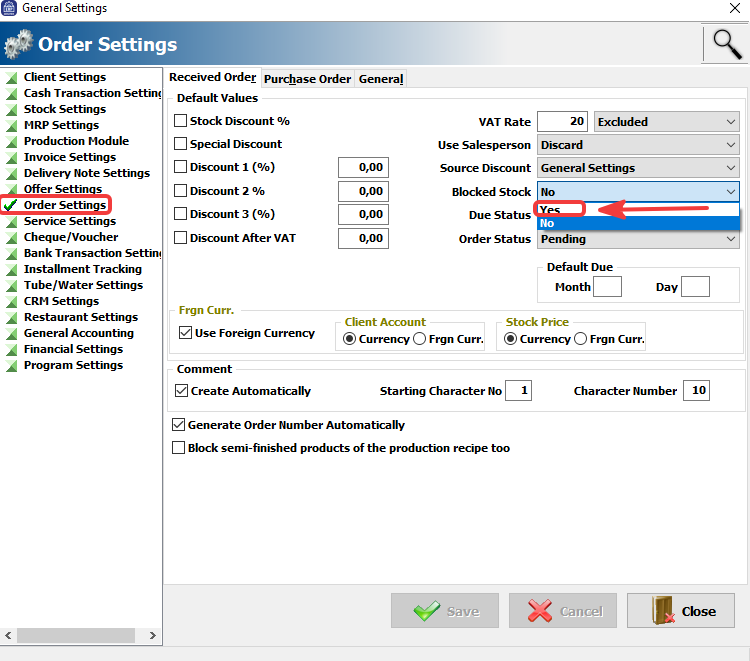
1) Admin -> Definitions -> General Settings -> Order Settings -> Stock block/deadline option should be active at received/given order menu.
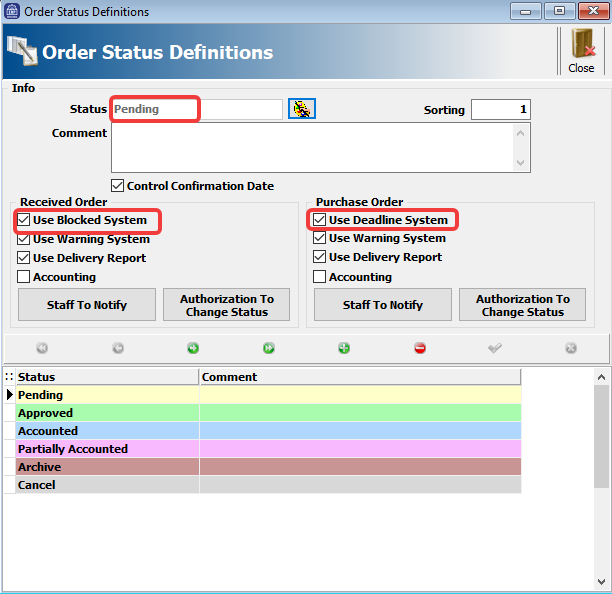
2) “Use Stock Block/Deadline system” option must be checked at Order Status Definition area.
BAŞKA BİR SORUNUZ MU VAR?
TEKNİK DESTEK EKİBİMİZE 7/24 ULAŞABİLİR VE TÜM SORULARINIZI İLETEBİLİRSİNİZ.
GÜVENLİK DOĞRULAMASI
Lütfen işlemi onaylayın