ÇÖZÜM BULAMADINIZ MI?
TEKNİK BİR SORUN YAŞIYORSANIZ UZMAN EKİBİMİZE ANINDA ULAŞABİLİRSİNİZ.
Stock Unit Definitons With Digits
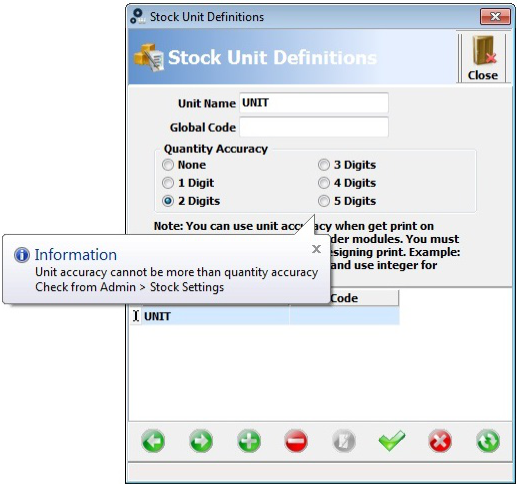
Firstly, open the stock unit definition.
After that, write the unit name and select quantity accuracy( choose one of digits for ex. 2 digits instead of none).
When you click on save, program shows you message.
Secondly, according to this message click on Admin(top of the panel).
Moreover, click on definitions and general settings.
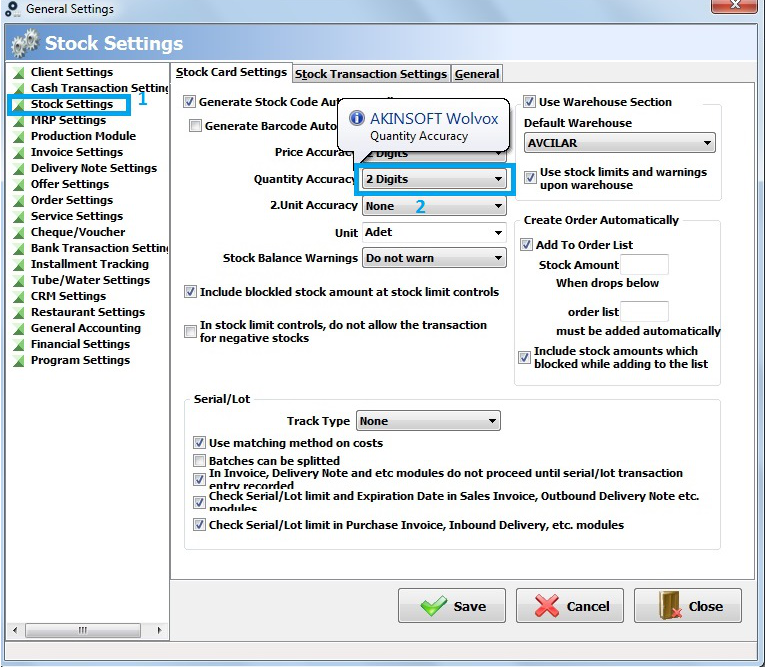
Thirdly, click on stock settings. In the stock card settings , you will see accuracies.
Furthermore, select 2 digits and save it.
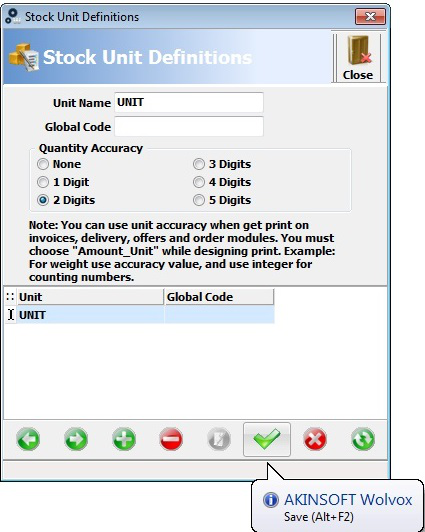
Finally, lets go back to the stock unit definitions and you can save your unit with 2 digits.
BAŞKA BİR SORUNUZ MU VAR?
TEKNİK DESTEK EKİBİMİZE 7/24 ULAŞABİLİR VE TÜM SORULARINIZI İLETEBİLİRSİNİZ.
GÜVENLİK DOĞRULAMASI
Lütfen işlemi onaylayın