ÇÖZÜM BULAMADINIZ MI?
TEKNİK BİR SORUN YAŞIYORSANIZ UZMAN EKİBİMİZE ANINDA ULAŞABİLİRSİNİZ.
What is TaskPano? How to Use?
WHAT IS TASKPANO?
TaskPano is business task mangement platform that can easily follow and control business plan with notifications sent on TaskPano.
- Can gather commincation of entire process by doing your business management on same application,
- Can group your process by giving quick desicion,
- Can assign task to any users for tasks that must be done in your company,
- Can share your documents with your team by adding attachment in task card,
- When new member join to crew, old conversations can be read old documents can be followed,
- Can assign personal tasks,
- Can create personal task by every TaskPano
Usage and Structure of TaskPano
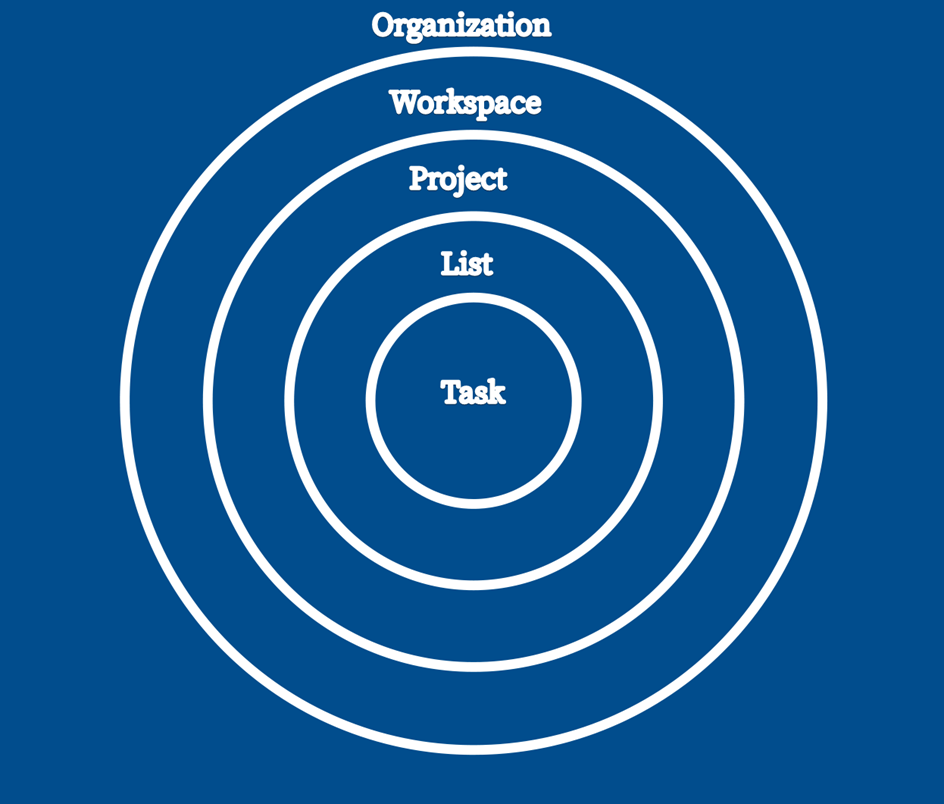
Taskpano has structure consisting of 4 layers. Manager in a layer become manager in all sublayers under of current layer. But participants will able to see only layers they authorized and if they are not authorized for sublayers they will not able to see sublayers. Therefore while adding a participant to any layer, that participant has to be add also for upper layers.
Structure of TaskPano;
- Organization
- Workspace
- Project
- List
And tasks are inside of list layer.
Structure of TaskPano can be symbolize as in image below.
BAŞKA BİR SORUNUZ MU VAR?
TEKNİK DESTEK EKİBİMİZE 7/24 ULAŞABİLİR VE TÜM SORULARINIZI İLETEBİLİRSİNİZ.
GÜVENLİK DOĞRULAMASI
Lütfen işlemi onaylayın